Feed
Talnet Social : draft posts

Talnet Social : draft posts
Draft posts are now available on Talnet Social
We're rolling out a new update to Talnet Social that lets you write now and publish when you're ready.
You can now save any post as a draft directly from the post editor, then come back to it, refine it, and publish whenever the timing is right. Drafts are private and only visible to you.
What's new
- Save draft button right in the post editor, so you never lose a half-finished post
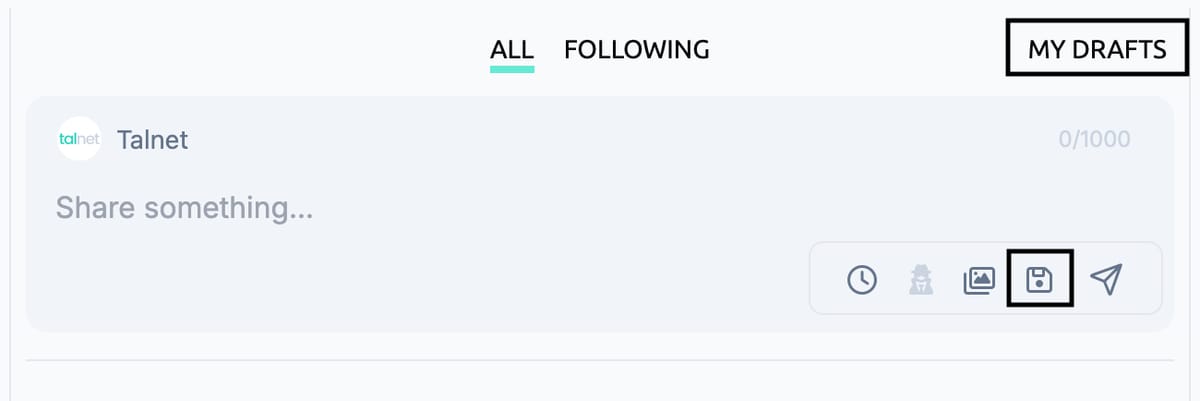
- New "My Drafts" tab in the feed navigation, next to All and Following
- Edit post button, now available in both thread mode and post mode
Why this matters
Good posts take time, and not every idea is ready the moment you have it.
- Write without pressure: Start a post, save it, and finish it when you have the time
- Keep your ideas organized: All your drafts live in one place instead of getting lost
- Polish before you publish: Edit your posts anytime, whether you're viewing a single post or a full thread
How it works
- Start a new post in the Talnet Social editor
- Click the save icon (Save draft) at the bottom of the editor
- Open "My Drafts" in the feed navigation at the top to see all your saved drafts
- Pick one up where you left off and publish when you're ready
What it looks like
Look for the floppy disk icon in the editor to save a draft, and the new "My Drafts" tab at the top of the main feed.
Want to join the conversation?
Comment, react, and connect with recruiters and employers on Talnet.
Share this post
Talnet Social : draft posts