
Talents
General talent posting flow
- Candidate Owner publishes a Talent Profile.
- The anonymized version is shown on the Talent Marketplace.
- When Candidate Owner submits a Talent Profile to a Job:
- Only the anonymized version is shared with the Job Owner.
- Once the Job Owner approves the Submission, the Split Agreement is sent to the Job Owner.
- Once the Job Owner signs the Split Agreement, the Split Agreement is sent to the Candidate Owner.
- Once the Candidate Owner counter-signs the Split Agreement, the full Talent Profile is released by Candidate Owner in the Submission modal to the Job Owner.
Changelog
No results found.
Jobs
General job posting flow
- The Job Owner publishes the role.
- The Candidate Owner submits an anonymized Talent Profile.
- The Job Owner reviews and approves the submission.
- A Split Agreement is generated based on the Job-Owner‘s-defined transaction conditions and is sent to the Job Owner.
- Split Agreement is signed by the Job Owner.
- The Candidate Owner countersigns the Split Agreement.
- Upon execution of the agreement, the full (non-anonymized) Talent Profile is released to the Job Owner by the Candidate Owner via the Submission
Transaction conditions
Important
Transaction conditions are set at the discretion of the Job Owner. While they are free to structure terms as they see fit, overly one-sided conditions may reduce engagement from experienced recruiters. Industry standard for split placements is typically a 50/50 split, a 90-day replacement guarantee, and payment upon client payment. Ultimately, the terms are yours to define – but fair, market-aligned conditions tend to attract stronger collaboration.
Overview
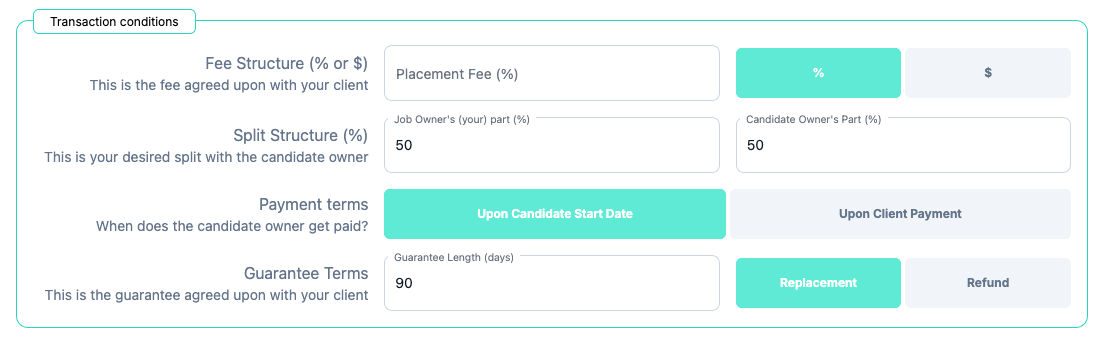
Transaction conditions define the financial, timing, and risk terms of a split placement before collaboration begins.
They ensure both parties align upfront on compensation structure, payment timing, and guarantee obligations – creating transparent, structured, and auditable recruiter-to-recruiter agreements.
All split collaborations on Talnet are governed by the agreed transaction conditions.
Terms
Fee Structure
The Job Owner must define the total placement fee agreed with the end client.
Options:
- Percentage of the candidate’s total compensation
- Flat Fee (fixed dollar amount)
This represents the full client fee before any split is applied.
Split Structure
The placement fee is divided between:
- Job Owner
- Candidate Owner
The split must total 100%.
Talnet allows the Job Owner to define the split structure upfront.
The default split begins at 50/50, with a minimum Candidate Owner share of 25%.
Payment Timing
The Job Owner must define when the Candidate Owner will be paid.
Options:
- Upon Candidate Start Date (invoice issued at start)
- Upon Client Payment (after funds are received from the end client)
This clarifies whether payment is based on invoicing or cash collection.
This ensures clarity before submissions are made.
Guarantee Terms
The Job Owner must define what guarantee is expected from the Candidate Owner in the event of early termination within the client guarantee period.
Options:
- Guarantee length (in days)
- Replacement
- Refund (money back)
Job verification
Notes
Job verification is optional and free – but verified roles typically attract higher-quality and faster submissions.

Overview
Job Verification allows Job Owners to confirm they have a signed agreement with the end client. Verified roles receive a visible checkmark, increasing trust and improving engagement from experienced recruiters.
Verification helps signal legitimacy and reduces hesitation from Candidate Owners before making submissions.
How It Works
- The Job Owner attaches their signed client agreement when posting the role.
- The Talnet moderation team reviews the document manually.
- Once verified, the job receives a verification checkmark.
Privacy & Document Handling
- Verification is a manual process handled by our moderation team.
- Contracts are not stored on Talnet’s servers.
- Documents are reviewed via secure email and are not retained after verification is completed.
Changelog
No results found.
Chats
Overview
Users can message each other directly through Talnet Chat.
To start a conversation, both users must follow each other.
This means:
- You can message a user who follows you.
- A user can message you only if you also follow them.
- Messaging is unavailable when the follow relationship is one-sided.
Changelog
2026-10-05 :
Social
Overview
Talnet now includes a built-in social network designed for meaningful professional discussions.
Users can create posts, comment, upvote valuable contributions, and follow people they want to hear from. As you participate, your activity helps build your credibility, reflecting engagement and contribution within the network.
Talnet Social is about signal over noise – conversations that help recruiters and professionals connect, share insights, industry intel and news, and learn from each other.
Why Talnet social?
In our business, reputation is everything. In a recruitment split network like Talnet, credibility matters most. On platforms like X, Facebook, or LinkedIn, your voice is often drowned out unless you already have an audience. Algorithms prioritize engagement over substance, encouraging like-farming just to be heard.
Here, your reputation matters because of what you contribute, not how loud you are. In a split network designed for professionals, Talnet helps you build, showcase, and maintain credibility – giving your insights the attention they deserve.
Talnet Social is designed to put professional credibility first. We promise that it will never be pay-to-play – your voice is valued for the quality of your contributions, not how much you spend.
We are committed to fair, transparent moderation. Discussions are guided by respect, relevance, and professionalism, not algorithms that prioritize clicks or noise.
Post topic classification
Social posts can be classified across four dimensions: Area, Stage, Focus, and Intent. Four questions instead of a single tag hierarchy.
It lays the groundwork for more granular content discovery, making it easier to find relevant discussions, surface related posts, and eventually help recruiters discover content semantically based on meaning and context, not just matching keywords.
Only L1 and L2 are a hierarchy. L3 and L4 are independent facets that apply to any L1/L2 combination
| Level | Name in UI | Question it answers | Selection |
|---|---|---|---|
| 1 | Area | What area is this post in? | 1 tag |
| 2 | Stage | Where within that area? | 1 tag, only if the L1 topic has children |
| 3 | Focus | What is it about? | 1 tag |
| 4 | Intent | What kind of post is it? | 1 tag |